

.png)
Open any cloud account and you'll find identities nobody is watching. A service account that hasn't been called in eight months but still holds admin privileges. A SAML user whose permissions came from a group nobody can fully trace. The "temporary" role someone spun up for a one-off migration two years ago - still sitting there, still wide open.
These aren't edge cases, they're where most identity risk comes from. The problem is context. You can list every role, user, service account, and group in your environment and still have no idea which ones actually matter. The gap between the access an identity has and the access it actually uses remains surprisingly difficult to see. That's the gap we built Entitlements to close.
Why Identity Data Has Been Impossible to Trust
If identity were just an inventory problem, it would have been solved years ago.
The real challenge is that the data behind identities is fragmented across systems that don't agree with each other.
- Permissions come from a configuration snapshot.
- MFA status comes from a different API and is often incomplete.
- Group membership lives in one schema, while transitive memberships get dropped or surface somewhere else entirely.
The identities your directory provider knows about don't always line up with the identities your runtime tools see taking actions. The result is an inventory that's difficult to trust and even harder to act on.
Most identity tooling only describes potential access. It can tell you what an identity could do. It can't tell you which permissions are actually being exercised. Without that context, every access review turns into a guessing game. Teams know overprivileged identities are risky. The problem is figuring out which permissions can be removed safely. A permission that hasn't been used in a year and a permission that's exercised every day often look identical in a traditional inventory.
One Inventory for Every Identity
Before teams can understand which permissions matter, they need a complete view of the identities that hold them. Entitlements give security teams a single place to understand who has access, what they're actually using, and where risk is accumulating.
The Identities page brings together every IAM user, service account, role, application, and group across your connected cloud environments into one view. More importantly, it correlates that inventory with runtime activity collected by the Sweet sensor, so you can see, not just what access exists, but whether it's actually being exercised.
The inventory is organized into three areas:
- Non-Human Identities covers service accounts, roles, applications, and workload identities across AWS, Azure, GCP, and Kubernetes.
- Human Identities covers users from AWS IAM, Entra ID, Google Workspace, and your SSO providers.
- Groups brings together IAM, Azure, and Workspace groups, including nested memberships that are often difficult to track.

The default view focuses on non-human identities. Non-human identities are where some of the most persistent access risk lives. Service accounts created for a single project remain active long after the project ends. Roles accumulate permissions over time because narrowing them down takes effort, and teams rarely have enough visibility to know what can be removed safely.
Bringing those identities into a single inventory is the first step. Understanding how they're actually being used is where things get interesting.
The "Have vs. Use" Question, Answered by Runtime-Powered Insight
Inventory alone doesn’t solve the problem. In Sweet, you can click any identity to open its drawer. The “Permissions” section lists every permission the identity holds, whether it was granted directly or inherited through a role or group. Next to each permission is a “Last Seen” timestamp showing when it was actually exercised.
.png)
That single column changes the conversation. An identity with twelve granted permissions but only one used in the last quarter is no longer a mystery because it's tracked at runtime, it's a right-sizing opportunity. Permissions that haven't been used in months naturally stand out from the ones driving day-to-day operations.
Some identities genuinely need elevated access and use it regularly. Others hold broad permissions that haven't been touched in a year. From a configuration snapshot, those identities look identical. With Last Seen attached to every permission, the difference becomes obvious.
But permissions only tell part of the story. Knowing which access is being exercised is useful. Knowing who is using it, what they're using it for, and where that access leads next is the next layer of context.
How Access Actually Moves
An identity might have broad access on paper, but that doesn't tell you who is using it, what it's being used for, or where that access leads next. In modern cloud environments, privileges often flow through assume-role chains, service accounts, and delegated identities. Reconstructing those relationships typically means digging through logs and manually piecing together a path that only exists for a moment in time.
Entitlements surfaces that context directly in the inventory. “Last Consumer” shows the identity that was most recently assumed or called a non-human identity. “Last Target” shows what that identity most recently acted as. Together, with the Part of Assume Chain indicator, they make relationships that once required multiple queries and log pivots visible at a glance.
The result is a clearer understanding of how access actually moves through your environment. Instead of looking at identities in isolation, teams can see how privileges flow between identities and understand the real blast radius behind a role or permission.
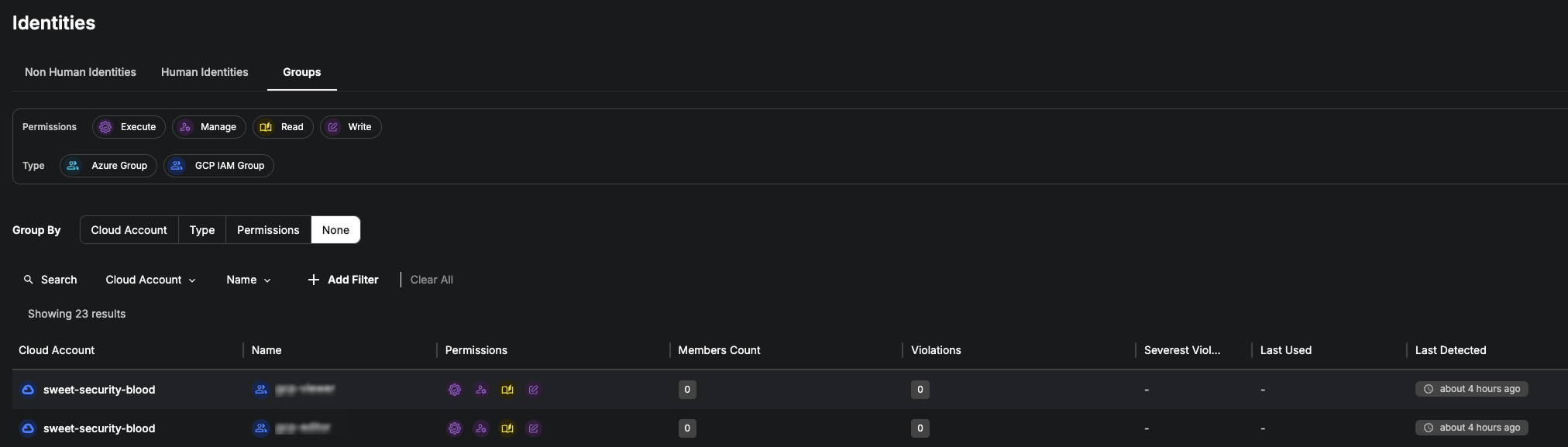
Groups provide another layer of that context. Open a group and you'll see both the permissions it grants and the members that inherit them. When unexpected access appears on a user, tracing it back to the source becomes much more straightforward.
Turning Context into Action
Once usage and relationships are visible, the next question becomes obvious: what should be fixed first? Entitlements Policies turns identity data into a prioritized worklist.
Sweet continuously evaluates identities against policies covering areas such as privilege risk, authentication hygiene, governance, identity hygiene, and secret management. Stale non-human identities, users without MFA, administrator-level permissions, unrotated credentials - the issues that tend to accumulate quietly over time.
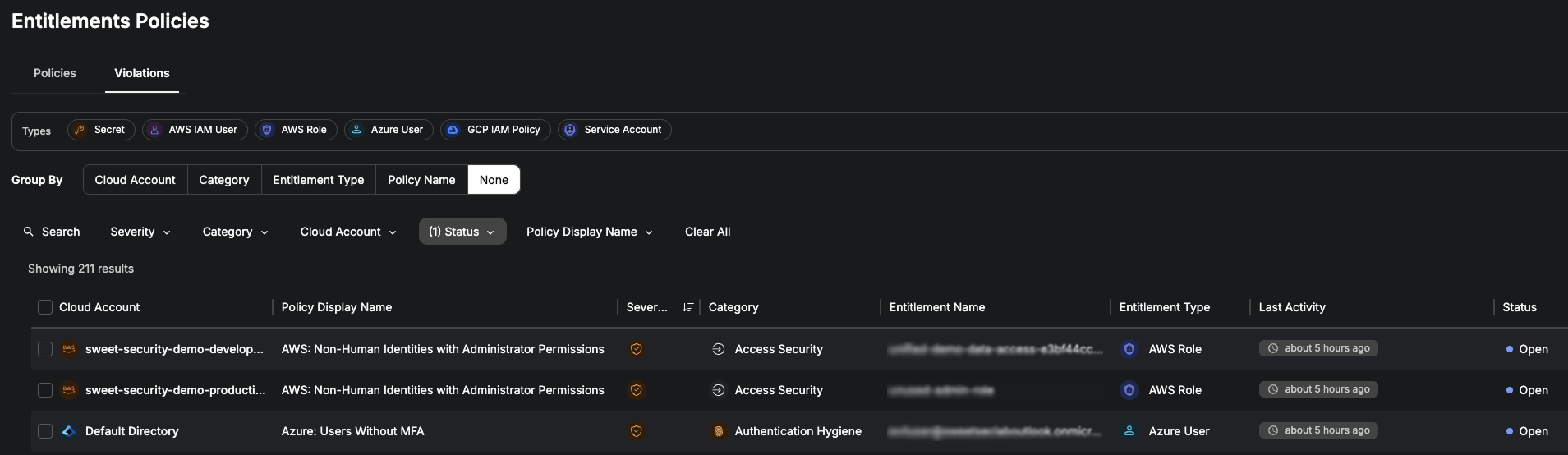
The Violations view brings those findings together in one place. Every violation includes a description of the issue, a path back to the affected identity, and guidance on how to remediate it. When ownership sits with another team, findings can be routed directly into Jira or ServiceNow with the relevant context attached.
Where to Start
A role with administrator permissions isn't necessarily a problem, and a service account that hasn't been used in six months isn't necessarily safe to remove. The challenge has always been understanding the difference between what access exists and what access actually matters.
That's what Entitlements is designed to solve. By connecting identity data to runtime activity, teams can see which permissions are being exercised, how access moves between identities, and where risk is accumulating. Instead of treating every permission, role, and group as equally important, they can focus on the identities that deserve attention and make access decisions with confidence.
The difference between granted access and used access is where most identity work begins. Entitlements makes that difference actionable.
Want to see Entitlements against your own environment? Talk to our team.